Why Shouldn't Your Preschool Have
Its Own App?
Claim your place on the App Store with your own logo and name. Offer parents a professional experience with AI-powered communication!
No sign-up · No credit card · See the director, teacher and parent screens right away
Don't want to wait? Start right away with our shared MobiKres app →Pick a role and the app opens on the phone
No sign-up or password. Tap through the screens with a sample nursery’s data.
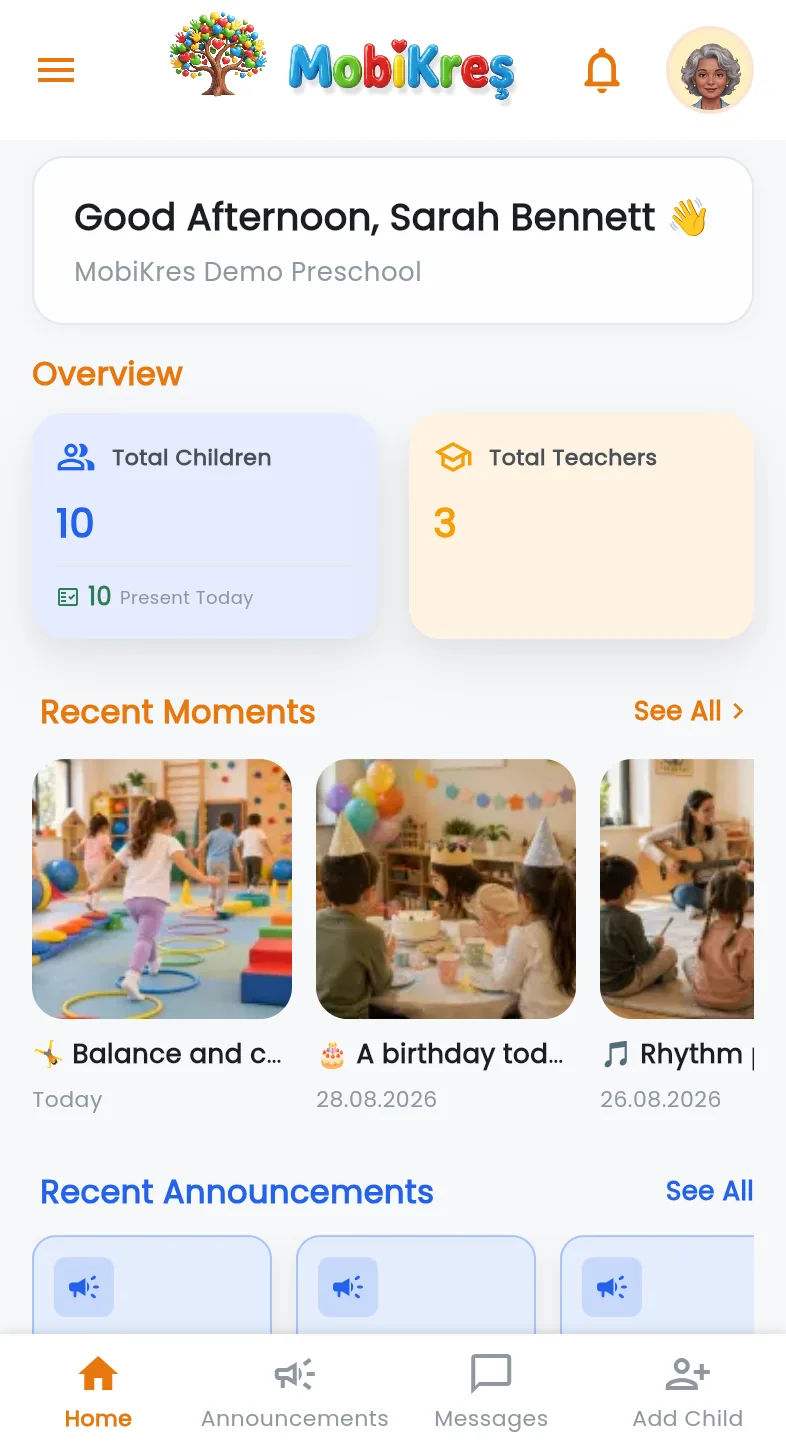
Why MobiKreş?
Preschool management has never been this colorful and easy!
Your Own Brand, If You Wish
A custom app published on the App Store and Google Play with your own logo and name.
Lightning Fast Communication
Message parents under a corporate umbrella without sharing numbers: photos, voice messages and a blue double tick once read.
Security & Backup
Your data is protected with cloud infrastructure, with the ability to recover deleted records minute by minute.
Uninterrupted Workflow (Offline-First)
Keep filling out attendance and reports even if your internet connection drops. The system automatically syncs when the connection is restored.
AI Assistant
AI turns hastily written messages and announcements into professional, pedagogical language and translates them into 8 languages with one tap.
Fast Bulk Data Entry
Save your students, menus, and schedules simultaneously and quickly in table view, not one by one.
Features
All the digital tools your preschool needs in a single app.
Detailed End-of-Day Report
Meal by meal, dish by dish, plus nap time, activities and the child's mood — delivered to parents with the teacher's own comments.
Works Without Internet
No signal out in the garden? No problem. Teachers fill in attendance and reports while offline, and the system syncs itself the moment the connection comes back. If something can’t be sent, users see it under My Sync Status and resend it in one tap.
Fast Bulk Data Entry
Don't waste time one by one. Save students, menus, and class schedules simultaneously in table format, ultra fast.
Surveys & Digital Approvals
No more paper waste! Collect survey responses or digital approvals from parents in seconds for trips and events.
Safe Pickup
Parents tap “I am on my way”, “I’m at the door” or “Someone else is picking up”; an alarm sounds on the teacher’s phone, even on silent. The teacher marks the child as handed over, and late pickups stand out.
Zero Errors: Medication Tracking
The medication time entered by the parent is tracked second by second with a cloud assistant and delivered to the teacher's phone as a "High Priority Alarm".
Tuition Collection & Finance Ledger
Parents see the exact balance in the app and reach the school's own payment page in one tap; card details never enter MobiKreş. Collections and discounts are gathered in a single income-expense ledger, where staff salaries are also entered as expenses, so your month-end picture sits on one screen.
Flexible Development Tracking
Your institution defines the development headings: Montessori, the national curriculum or your own guidance framework. Teachers log observations per child and an individual development map builds up over time.
Tagged Photo & Video Sharing
Share classroom moments, videos and photos; trim videos with the built-in editor, and videos are shared in sharp 720p. If the connection drops, long videos resume uploading where they left off. Tag every shot with the students in it, so parents reach their own child's moments without scrolling through hundreds of images.
Live Announcement System
End paper waste and WhatsApp noise. Let emergencies and events reach the target audience as push notifications in the same second.
Instant Attendance Notification
Did they arrive at school? Send an instant "Not Present Today" notification to parents of absent students for transparent tracking.
Transparent Menu & AI Allergy Shield
Any change to the menu is instantly on their phones. Daily menus are analysed by AI to flag risky allergens automatically; the parent and teacher of an at-risk student get a targeted notification and a warning banner appears in the app.
Staff & Management Module
Define job titles, subject specialities and class assignments separately — one teacher can cover several subjects. School documents, inter-class communication and parent-teacher assignments live on the same screen.
AI Assistant
Get role-aware message suggestions written in proper pedagogical language (parent–teacher, teacher–admin). Translate any message into 8 languages instantly.
Advanced Admin Settings
You decide which modules are switched on and who can see what. Every action is written to the activity log, so you can always look back and see who did what. You can even have an administrator who never sees fees, payments or salaries.
Configurable Alarms & Notifications
Choose exactly which notification reaches whom. For reminders that must not be missed, set an alarm that sounds even when the phone is on silent.
Parents See Only Their Own Child
If the preschool chooses, each parent sees only the photos their own child is tagged in, or only their own class's posts. Downloading is a separate permission the preschool controls.
Development & Guidance Tracking
Academic, emotional, motor and language development are recorded separately, with guidance categories your school defines. Parents receive a concrete progress report at the end of each term.
Height & Weight Charts
Teachers enter measurements; parents watch their child's growth curve over time. No separate notebook to keep.
Document Approval & Read Receipts
Upload contracts, policies and newsletters; parents tap “I have seen and approve”, and you see exactly how many confirmed. Your record when an inspection or a dispute comes.
Messaging Hours
You decide the hours during which parents can send messages. Your teachers stop dealing with midnight texts — the boundary is enforced by the software.
Staff, Salary & Leave
Start date, employment type, current net salary, leave days and class assignments on a single card. Salary payments are entered in the income–expense ledger as staff expenses.
Parents Use Their Own Language
The interface runs in eight languages: Turkish, English, German, Russian, Arabic, Ukrainian, Azerbaijani and French. Communicating with foreign families no longer needs a translator.
Photos and Voice Messages in Chat
Teachers and parents send photos and voice messages of up to 5 minutes right in the chat. Read messages get a blue double tick. Messages sent without internet aren’t lost; they go out when the connection returns.
Bulk Download from the Gallery
Parents save their child’s photos and videos to their phone, and download a selection as a single ZIP from a computer. The preschool decides whether downloading is allowed.
Read the Menu and Timetable From a Document
Upload your monthly menu and class timetable as Excel, PDF or a photo of the printed sheet; AI parses them and lays them out on screen, you check and save. Typing them by hand disappears as a task.
Paid Events: Consent & Collection
Set a fee for trips and events; parents approve per child, and you see who approved and who paid on one screen. The attendance list is grouped into Attending, Not attending and No response. No more envelopes and paper lists.
Replies and Reactions in Chat
Swipe a message to reply with a quote above your answer, or leave a reaction like 👍 ❤️ 🙏. Under an announcement, parents tap “Reply to teacher” to write directly to its author.
Who Has and Hasn’t Seen It
See how many people viewed each announcement and survey, plus a list of those who haven’t opened it yet. Teachers see who read their own announcements, and you decide whether they can announce school-wide or only to their own classes.
Photo Permission from Parents
If you choose, parents give digital photo permission for the gallery. Teachers see a “No photo permission” badge on children without it and cannot tag them in posts; admins see the status class by class and can record permission collected on paper.
How Long Photos Are Kept
Photos are kept while the institution’s subscription continues and are never deleted automatically. On request, posts made before a chosen date are deleted on a date agreed with MobiKreş; the preschool informs parents, who can download photos until then.
Easy to Read for Everyone
Each user picks a light or dark theme, font and text size. Payment statuses use color-blind-friendly colors plus symbols like ✓ and !.
Your Data is Always Secure
MobiKreş runs on enterprise-grade cloud infrastructure certified to international security standards. Data loss is virtually impossible.
Minute-by-Minute Recovery
We can restore to any minute within the last 7 days. An accidentally deleted record can be recovered in seconds.
Automatic Daily Backup
A full backup is taken automatically every day. We can restore to any backup within the last 30 days at any time.
Weekly Long-Term Archive
Sunday backups are stored for 98 days (≈3.5 months). We can even resolve issues that go unnoticed for a long time.
How Far Can We Go Back? Summary Table
All these safeguards are provided automatically by our enterprise-grade cloud infrastructure.
How It Works?
Digitizing with MobiKreş is very easy! Your custom app is ready in just 4 steps.
Contact Us
Share your needs and preschool details with us.
Design Approval
Let us prepare a custom UI design with your logo and corporate colors.
Data Entry
Let us bulk upload your student and class lists into the system.
Store Release
Your app is ready to download on the App Store and Play Store!
Institutions That Trust Us
Schools going digital with our white-label app model have taken their place on the App Store and Google Play under their own brand.
Renkli Kalem Preschool
Aydın / Söke
"Our parents now download the app from the App Store and Google Play by searching for our own school's name. It has given us incredible institutional prestige, and parent satisfaction has grown tremendously."
Dalya Bilim Daycare Center
İzmir / Karşıyaka, Türkiye
"MobiKreş has made our daily routine, program tracking and communication at Dalya Bilim much easier. As an institution that had used a different app before, switching to MobiKreş after 7 years was both very practical and very efficient. All of our teachers and parents adapted quickly. 🌿"
Would you like to see your institution's name on the App Store and Google Play too?
Request a Free DemoFrequently Asked Questions
What is the best mobile app for preschools?
We compared preschool software on the market; explained the top 5 solutions and why MobiKreş stands out.
Read All →How can we get a custom mobile app for our preschool?
We explained step by step how the turnkey white-label app process works without hiring developers.
Read All →10 advantages of digitizing preschool management
Save at least 3 hours a day: we examined the benefits of digitizing attendance, reports, and parent communication.
Read All →What to use instead of WhatsApp for parent communication?
GDPR violation risks, messy groups... We explained why WhatsApp causes problems for preschools and better alternatives.
Read All →How does the preschool tuition tracking system work?
Secure online payment, automatic receipts, and delay notifications... We explained ways to automate tuition tracking.
Read All →How many days does MobiKreş setup take?
Contact → Design Approval → Data Entry → Store Release. Your app is ready in an average of 20 business days.
Read All →Quick Answers
What is MobiKreş?
MobiKreş is a preschool management software platform that offers custom white-label iOS and Android mobile apps for preschools and kindergartens. A comprehensive digital solution published on app stores with your preschool's own name and logo, offering parent communication, digital attendance, tuition tracking, daily reports, and more in a single platform.
What is a preschool management system?
A preschool management system is software that digitalizes the daily operations of preschool and kindergarten institutions. It includes modules for student tracking, parent communication, attendance, tuition tracking, meal menus, daily reports, and more. MobiKreş offers all these functions in a single mobile app platform.
How is a White-Label Preschool App made?
Your custom iOS and Android app for your preschool is ready in 4 steps with MobiKreş: 1) Contact us and share your needs, 2) Custom design approval with your logo and corporate colors, 3) Upload your student and class data to the system, 4) Your app takes its place on the App Store and Google Play.
What is the difference between MobiKreş and MobilKreş?
MobiKreş offers each preschool and kindergarten a completely custom white-label app under their own brand; your app appears on the App Store under your preschool's own name. MobilKreş, on the other hand, serves through a shared platform. With MobiKreş, your corporate identity comes first and you stand out from competitors.
What features are included in the preschool app?
MobiKreş includes parent notification, digital attendance with instant notifications, daily end-of-day reports (meals, sleep, activities, mood), photo and voice messaging, tuition tracking and collection management, medication tracking with high-priority alarms, safe student pickup module, photo and video gallery, meal menu management, surveys and digital approvals, institution-defined development tracking, and white-label customization.
Is the preschool software paid?
You can contact us via WhatsApp to get a free demo and pricing information for MobiKreş. Pricing is determined based on the size and needs of your institution.
Why use an app with our own logo instead of an off-the-shelf program?
An app with your own logo raises your preschool's brand value and prestige. Parents get the morning attendance notice and the evening daily report with your preschool's name and logo, and your app is listed on the App Store and Google Play under your own name. Parents see your school as more professional and trustworthy, you can say “we have our own app” in enrollment meetings, and you gain a corporate identity that sets you apart from competitors.
Digitize Your Preschool Now!
Fill out the form and we'll send you a custom quote as soon as possible. Or reach us via WhatsApp anytime!
Do You Want a Fast Reply?
Write to us on WhatsApp, we usually respond within 15 minutes.
Write via WhatsApp